
What is the best organizational structure for my AWS account?
For web development, whether personal or professional, and the services offered by cloud providers like AWS, it is best to define and maintain a secure and functional structure. This will provide us with security
For web development, whether personal or professional, and the services offered by cloud providers like AWS, it is best to define and maintain a secure and functional structure, which will provide security and efficiency in the cloud computing area.
"With order and time, one finds the secret of doing everything, and doing it well"
Pythagoras
In this blog we offer what in C4C7OPS we consider as best practices in the organizational process of cloud computing.
Our goal will be to create an organization (in this case 'production') with an independent account from its main user.
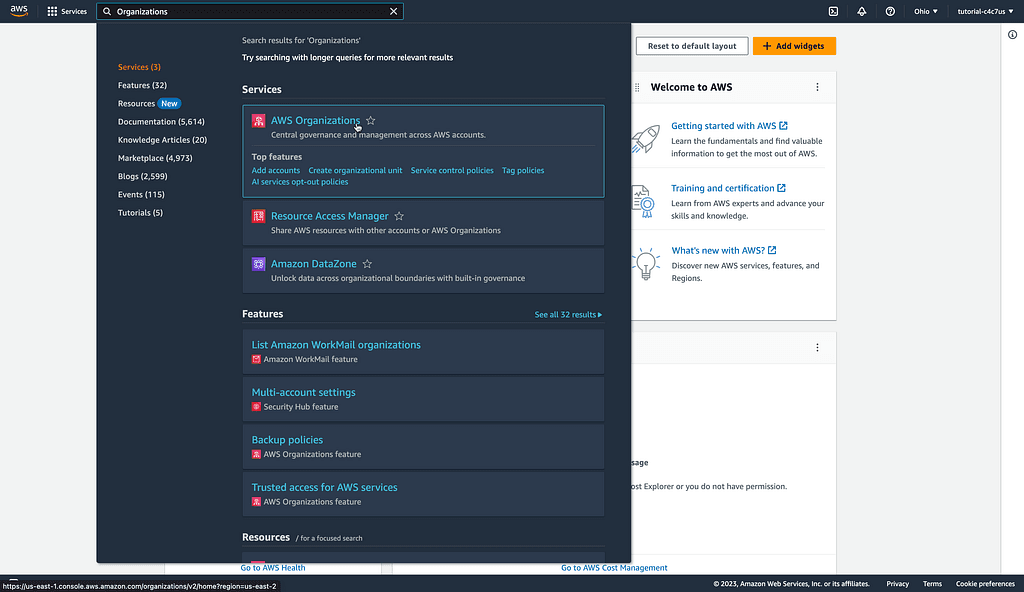
First, we will type 'Organizations' in the search bar at the top of the AWS console initial view, and click on the 'AWS Organizations' option.

In the new window we will observe two possible cases:
1. If you have not previously created an organization, you will have to click the 'Create an organization' button, to place yourself at the point of creating an organizational unit.


2. Otherwise, if you have already created an organization, you will see the following window, which allows the creation of accounts and organizations.

Now you must click on the organization that will be the parent of the organizational unit, in this situation we will select 'Root' and subsequently 'Organizational unit' > 'Create new'

This will take us to a new window, where we can create our organization
- In the ‘Organizational unit name’ field, we will write the name we want to give our organization, in this case ‘production’
Then we will click the ‘Create organizational unit’ button

We can observe two results
- The organizational unit was created as a dependent (according to the tree) of the ‘Root’ organization as we defined from the beginning
- The unit has no associated resources, this means it doesn't have an ‘AWS account’ or ‘AWS organizational unit’ assigned to it

Now we will create an ‘AWS account’ in order to link it to the new organization established previously, for this we will click on ‘Add an AWS account’

In the view we get, we keep the ‘Create an AWS account’ option selected by default:
- For the ‘AWS account name’ field, we suggest writing the same name as the created organization, in this circumstance ‘production’
- ‘Email address of the account’s owner’, this field must contain the email that will be associated with the account, this email can be an alias (as gmail allows), the important thing is that the email is valid
- ‘IAM role name’, we will leave this as offered by default, with the value ‘OrganizationAccountAccessRole’
To finish, we click on ‘Create AWS account’

This process may take a couple of minutes, we will observe the following notifications at the top of the console, to view the creation process you can click on ‘View all pending creation requests’

Luego de crear la cuenta podemos observarla en la estructura de la organización, esta se encuentra en el primer nivel dentro de ‘Root’, esto se debe a que todas las cuentas que registremos van a estar directamente dependientes de la organización raíz

Lo anterior no es problema, ya que moveremos la cuenta hacia donde la requerimos, en este caso la trasladamos de ‘Root’ a ‘production’, para cumplir con esto,
- Debemos seleccionar la cuenta
- Pulsamos sobre ‘Actions’ > ‘AWS account’ > ‘Move’

Indicamos la organización que va a contener la cuenta (production) y pulsamos ‘Move AWS account’

Podremos validar el resultado correcto desplegando lo contenido por nuestra unidad organizacional ‘production’, además, ahora conocemos que los registros creados son posibles de mover y cambiar, así que si a futuro se requiere una modificación, esta se podrá realizar sin problema.

Hemos concluido este blog con el objetivo de respaldar y compartir la forma óptima en la que C4C7OPS aborda la gestión de sus cuentas en la consola AWS, además de presentar su estructura organizativa de manera más efectiva.
Síguenos C4C7OPS 😉.